
Self-Service Kiosks: Cutting Staff Load at Busy Events
Self-service check-in kiosks let guests register themselves, freeing your team for higher-value work. Here is when and how to use them well.
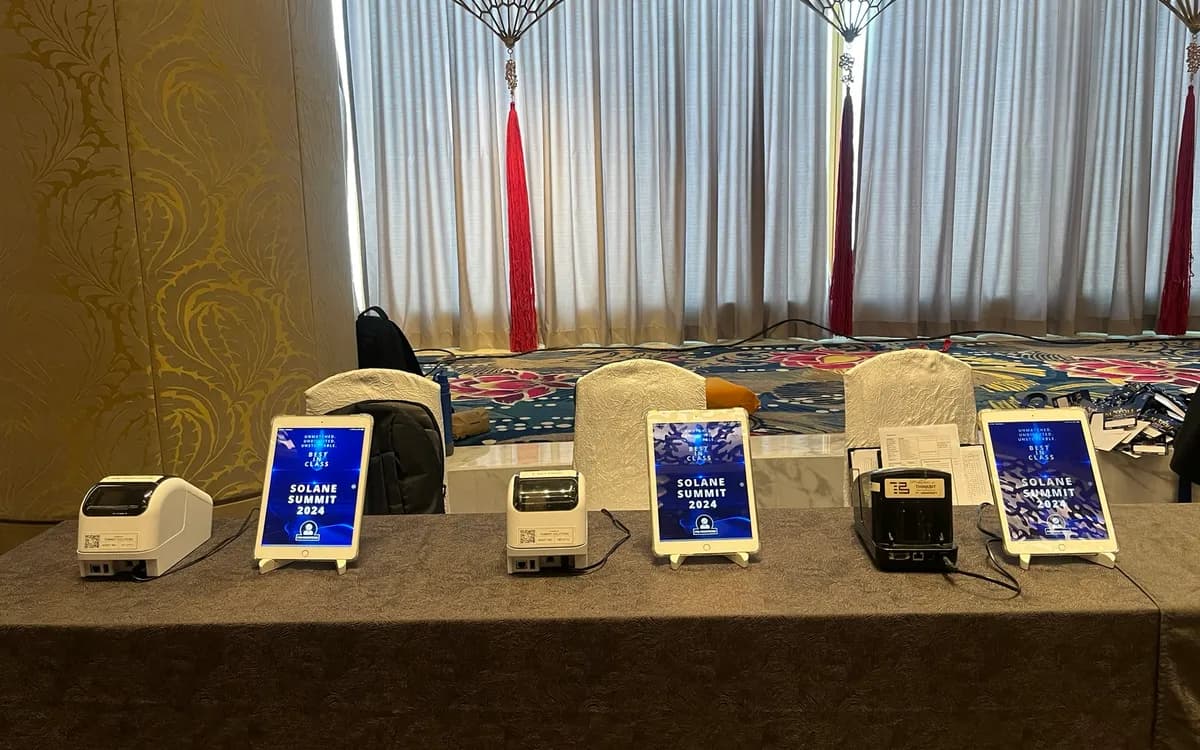
Staffed registration desks work well, but they have a natural limit: every lane needs a person, and good people are the most stretched resource at any event. Self-service kiosks offer another path — letting guests check themselves in on a tablet, freeing your team to focus on welcoming, troubleshooting, and the moments that genuinely need a human.
Used in the right situations, self-service kiosks can dramatically cut your staffing load. Here is how to use them well.
How Self-Service Check-In Works
The idea is simple. Instead of a staff member finding a guest on a tablet, the guest does it themselves. They approach a kiosk — an iPad on a stand — search for their name or scan a confirmation, confirm their details, and check in. If badges are being printed, one appears at a nearby printer for them to collect.
The whole interaction is designed to be self-explanatory, so guests need no instruction to complete it.
When Self-Service Shines
Self-service is not right for every event, but it excels in specific situations:
- Tech-comfortable audiences. Corporate, industry, and younger crowds take to self-service instantly.
- Large events with pre-registered guests. When most attendees are already in the system, self-service lets hundreds check themselves in quickly across a bank of kiosks.
- Simple check-in. If registration is just confirming a name and collecting a badge, it is ideal for self-service. The more steps involved, the more a staffed lane makes sense.
- Extended arrival windows. For expos and open-house formats where people arrive throughout the day, kiosks quietly handle a steady stream without tying up staff.
When to Keep Staff
Self-service is a tool, not a wholesale replacement. Keep staffed lanes for:
- VIPs and speakers, who deserve a personal welcome.
- Complex check-in involving payments, documents, or verification.
- Audiences less comfortable with technology, where a friendly person makes all the difference.
- Exceptions, which always occur — misspellings, unregistered guests, last-minute changes.
The best setups often combine both: a bank of self-service kiosks for the pre-registered majority, plus one or two staffed lanes for VIPs and anyone who needs help.
Designing a Kiosk That Works Unassisted
A self-service kiosk lives or dies on how obvious it is to use. A few principles:
- Keep it to the fewest possible steps. Every extra tap is a chance for a guest to hesitate.
- Make instructions visible. A short, clear prompt at each kiosk tells people exactly what to do.
- Mount it at a comfortable height. A floor stand at the right height makes the kiosk approachable and accessible.
- Place printers logically. If badges print, put the printer right where guests expect to collect them, clearly labeled.
Do Not Leave Kiosks Entirely Alone
Even a self-service setup benefits from a nearby staff member — not running the kiosks, but hovering to help the occasional guest who gets stuck or has a question. One person can oversee a whole bank of kiosks, which is a fraction of the staffing a fully staffed desk of the same capacity would require. That is the real efficiency: fewer people covering more guests.
The Staffing Payoff
Consider a 600-person conference. A fully staffed desk might need seven or eight lanes and just as many people during the peak. A self-service setup — say, eight kiosks overseen by two roaming staff, plus one staffed VIP lane — handles the same crowd with a fraction of the headcount. Those freed-up team members can be welcoming guests, directing traffic, or handling the event itself.
Ease Guests Into Self-Service
Even a well-designed kiosk benefits from a gentle on-ramp. Guests approaching a bank of self-service stations for the first time can hesitate, unsure whether they are meant to use them or wait for a staff member. A simple, welcoming cue — clear signage inviting them to check themselves in, and a staff member gesturing them toward an open kiosk — removes that hesitation. The first few seconds are where self-service adoption is won or lost; make the invitation to self-serve unmistakable and friendly.
Positioning matters too. Kiosks placed where guests naturally arrive, with room to approach and a clear flow toward badge collection and the event beyond, feel intuitive. Kiosks tucked awkwardly to one side, or without an obvious next step after check-in, create confusion that pulls staff over to help — the opposite of the intended benefit. Walk the guest path yourself and make sure each kiosk sits where a guest would expect it and leads clearly to what comes next.
Keep watching how guests use the kiosks during the event, and adjust. If you notice people consistently stumbling at a particular step, a quick fix — clearer signage, a staff member repositioned, a word of guidance — can smooth it for everyone who follows. Self-service is not set-and-forget; a little attention to how real guests interact with it turns a good setup into a frictionless one. Over a few events, you will learn exactly where your audience needs a nudge and where they breeze through, and your self-service check-in will get steadily smoother. The goal throughout is that guests feel helped, not abandoned — self-service should feel like a fast, easy option offered warmly, with a person nearby if they want one.
The overarching principle is that self-service should feel like a well-designed convenience, not a hurdle. When guests can check themselves in quickly, with a person nearby if they want one, self-service earns its keep — shorter lines, lower staffing, and a modern feel, all without sacrificing the welcome. Get the on-ramp, the placement, and the ongoing attention right, and self-service becomes one of the most efficient tools in your registration toolkit, especially as your events grow.
A Smarter Use of Your Team
Self-service kiosks are not about removing the human touch — they are about spending it where it matters. Let the pre-registered majority check themselves in, keep staff for VIPs and exceptions, and design the kiosks to be genuinely self-explanatory. The result is shorter lines, lower staffing costs, and a team focused on hospitality rather than data entry.
If you are planning a large event in Metro Manila, we can set up a self-service kiosk experience — iPads on stands, on-demand badge printing, and clear signage — alongside staffed lanes where you need them. Delivered, installed, and configured by our team.
Planning an event?
We deliver and set up iPads, printers, and registration tech across Metro Manila.
Request a quote