
Making Event Check-In Accessible and Inclusive
A registration desk should welcome everyone. Here is how to design check-in that works for guests of all abilities, ages, and comfort levels.
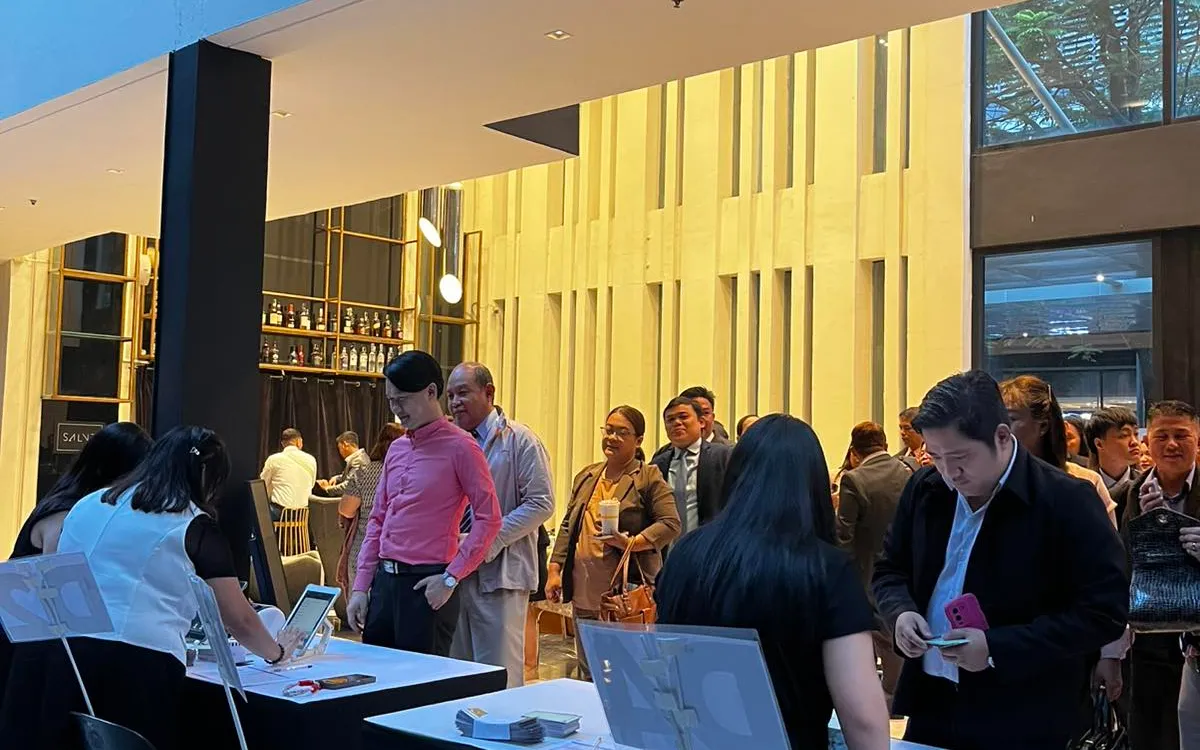
A registration desk is the first thing every guest encounters, which means it is also the first place an event can quietly exclude someone. A check-in process designed only for the average guest can leave others — people with disabilities, older attendees, those less comfortable with technology, guests who do not speak the default language — struggling at the very entrance. A little thought makes check-in genuinely welcoming to everyone.
Here is how to design accessible, inclusive registration.
Design for a Range of Abilities
Not every guest interacts with a kiosk or desk the same way. Some use wheelchairs; some have limited vision; some have limited dexterity. A few practical choices go a long way:
- Mount self-service kiosks at an accessible height. A floor stand set too high excludes wheelchair users and shorter guests. Choose a height reachable by seated and standing guests alike.
- Keep the path clear. Ensure there is room to approach the desk or kiosk, including for someone using a wheelchair or mobility aid, without navigating a tight or cluttered space.
- Make text large and high-contrast. On kiosk screens and signage, generous, high-contrast text serves guests with limited vision and everyone else too.
Always Offer a Human Option
Self-service is efficient, but it should never be the only way in. Some guests will find a kiosk difficult, confusing, or inaccessible. A staffed lane alongside self-service kiosks ensures anyone can get help checking in. The presence of a friendly person to fall back on is itself reassuring.
Brief your staff to offer assistance proactively and patiently, without making anyone feel singled out. The goal is that every guest, whatever their needs, gets checked in with the same ease and dignity.
Consider Guests Less Comfortable With Technology
Not everyone finds a tablet intuitive. Older guests, or those simply unused to touchscreens, may hesitate at a self-service kiosk. This is not a reason to avoid technology — it is a reason to pair it with human support. Keep staffed lanes available, and have team members ready to guide anyone who prefers help.
Clear, simple on-screen instructions help too. The fewer steps and the plainer the language, the more approachable a kiosk is for everyone.
Mind Language
In a diverse city like Metro Manila, guests may be more comfortable in different languages. Where relevant, consider signage and kiosk prompts in more than one language, and have staff who can assist in the languages your audience uses. Even simple, universally understood signage — icons alongside words — helps guests navigate check-in confidently.
Make Signage Work for Everyone
Good signage is an accessibility feature. Large, clear, well-placed signs help guests with limited vision, guests in a hurry, and guests unfamiliar with the venue alike. Use plain language, high contrast, and icons where they aid understanding. Guide people to the right lane before they reach the desk, so no one has to ask or guess.
Reduce Stress at the Door
Accessibility is partly about reducing the anxiety of arrival. Long lines, confusion about where to go, and a rushed desk are hardest on the guests who already find events stressful. A calm, well-organized, well-staffed check-in — with clear signage and patient help available — lowers the barrier for everyone, including those with anxiety or sensory sensitivities.
Ask and Improve
The best way to learn whether your check-in is truly inclusive is to ask. Invite feedback from guests about their arrival experience, and pay attention to where people struggle. Each event teaches you something about who your setup serves well and who it does not, and small adjustments compound into a genuinely welcoming entrance.
Train Staff on Inclusive Service
Accessible equipment and layout matter, but the human element is just as important, and it can be trained. Brief your registration staff on serving a diverse crowd with patience and grace: how to offer help without making anyone feel singled out, how to assist a guest who is struggling with a kiosk, how to be patient with someone who needs a moment. Inclusive service is a skill, and a team coached in it makes every guest feel equally welcome regardless of their needs.
Teach staff to read situations and offer help proactively but sensitively. A guest hesitating at a kiosk may welcome a gentle "can I help you with that?" — offered warmly, not impatiently. An older guest or one less comfortable with technology should be able to check in with a friendly person without any sense of being a nuisance. The tone matters enormously: the same assistance offered warmly includes a guest, while offered impatiently it embarrasses them. Coach your team toward the former.
Prepare staff for the specific needs they may encounter, too. A guest using a wheelchair, one with limited vision, one who speaks a different language, one who is anxious — each is served better by a team that has thought about these situations in advance rather than improvising awkwardly. This need not be elaborate training; a thoughtful briefing that raises awareness and sets the expectation of patient, gracious, inclusive service goes a long way. The goal is a team that instinctively makes every guest feel expected and welcome, whatever their needs. Inclusive registration is ultimately delivered by people, and people can be prepared to deliver it well. Combined with accessible equipment and layout, a well-briefed team turns an inclusive entrance from an aspiration into a consistent reality that every guest experiences.
Welcome Means Everyone
An inclusive registration desk is not a special accommodation bolted on — it is simply a well-designed one. Accessible kiosk heights, a human option always available, support for guests less comfortable with technology, thoughtful language and signage, and a calm atmosphere serve every guest better, not only those with specific needs.
If you are planning an event in Metro Manila, we can help you set up check-in that welcomes everyone — accessible kiosks, staffed lanes, and clear signage — delivered and installed by our team.
Planning an event?
We deliver and set up iPads, printers, and registration tech across Metro Manila.
Request a quote