
Digital Signage and Wayfinding With Tablets
Lost guests are unhappy guests. Here is how tablets can guide attendees around your event with clear, flexible digital signage.
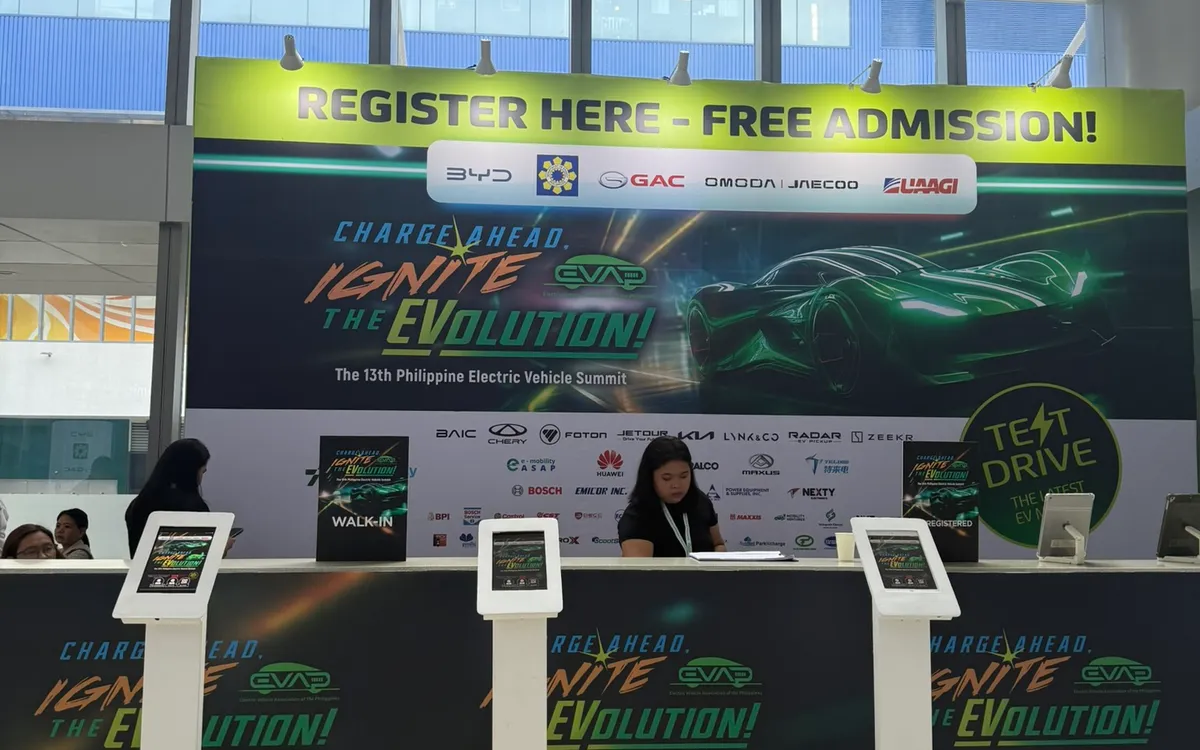
A guest who cannot find the right room, the registration desk, or the way to the parking is a frustrated guest — and at a large event, confusion at scale creates congestion, missed sessions, and a general sense of disorganization. Good wayfinding solves this, and tablets have become a flexible, attractive way to guide people around an event.
Here is how to use digital signage and wayfinding to keep your guests oriented.
Why Digital Beats Printed Signs
Printed signs work, but they are inflexible. Once printed, they cannot change — and events change constantly. A session moves rooms, a schedule shifts, a queue needs redirecting. A printed sign is now wrong, and someone has to reprint and replace it.
Digital signage on a tablet updates instantly. A schedule change, a room swap, a new direction — all can be reflected in moments, across every screen. That flexibility is invaluable at a live event where things move.
Where Wayfinding Tablets Help Most
A few high-value placements:
- At the entrance. A welcome screen orienting guests the moment they arrive: where to check in, where the main sessions are, what is happening now.
- At decision points. Where corridors branch or guests must choose a direction, a tablet showing the way prevents wrong turns.
- Outside session rooms. A screen showing what is on in that room, and when, keeps guests confident they are in the right place.
- At the registration area. Directing guests to the right lane and onward into the event.
Mounted on floor stands, these tablets stand where guests need them, at a readable height, without requiring a wall or a table.
Keep the Information Glanceable
Wayfinding signage must be understood in a glance — a guest walking past will not stop to study a screen. Keep each display simple: one clear message, large text, an obvious direction or map. Resist cramming multiple messages onto one screen. If a display tries to say everything, it communicates nothing.
Use clear visual hierarchy, generous text size, and directional cues that read instantly. The best wayfinding feels effortless because the guest barely notices reading it.
Show What Is Happening Now
One of the strongest uses of digital signage is showing the live program — what is on right now and what is next. A guest glancing at a screen can see the current session, upcoming sessions, and where to go, without consulting a printed program or an app. For multi-track events especially, this keeps everyone oriented in a schedule that would otherwise be hard to hold in your head.
Because it is digital, this updates automatically as the day progresses, always showing the current state.
Double Up: Signage and Other Functions
A tablet used for wayfinding can serve other purposes at quieter moments or in the same location. A screen might show directions, then a sponsor message, then the next session. At the entrance, a welcome-and-wayfinding display reinforces your branding while it guides. This flexibility gets more value from each device.
Plan Placement Deliberately
Effective wayfinding comes from thinking like a lost guest. Walk your venue and ask, at each point, "where would someone be unsure where to go?" Place your signage there. The entrance, the branch points, the room approaches — these are where a screen earns its place. A well-placed display prevents a hundred small moments of confusion.
Keep Them Powered and Positioned
Wayfinding tablets run all day, so plan for power at each location, and position them where they are visible but not in the way of foot traffic. A screen guests cannot see, or that blocks a path, defeats the purpose. Stable floor stands at readable heights, near a power source, are the practical setup.
Keep Content Fresh Through the Day
The great advantage of digital signage is that it can change, and the best wayfinding takes full advantage by keeping content current through the day. As sessions start and end, as the program moves, as situations shift, your screens should reflect the present moment rather than a fixed snapshot. A screen showing "happening now" that actually shows what is happening now is far more useful than a static schedule that guests must mentally translate against the clock. Assign someone to keep the digital content current, or use a setup that updates automatically.
This live quality lets signage respond to the unexpected, too. If a session moves rooms, a queue needs redirecting, or a schedule slips, your screens can communicate the change instantly across the venue — something printed signs simply cannot do. This turns wayfinding from a passive map into an active tool for managing the event as it unfolds. When something changes, updating the screens is often the fastest way to inform everyone at once.
Plan the content lifecycle deliberately: what each screen shows at different points in the day, and how it transitions. A welcome-and-orientation display in the morning might shift to a live-program focus during sessions, then to next-steps or thank-you content as the event winds down. Thinking through this arc means your signage stays relevant at every stage rather than showing morning content in the afternoon. The flexibility to keep content fresh is exactly what makes digital signage worth using over print — so use it fully. Signage that lives and breathes with the event guides guests genuinely well; signage set once and forgotten squanders the format's main advantage and can even mislead as the day moves on past what it shows.
Guide, Do Not Confuse
Good wayfinding is invisible when it works and sorely missed when it is absent. Digital signage on tablets gives you flexible, updatable, attractive guidance that keeps guests oriented and your event flowing. Keep the messages glanceable, place the screens where confusion arises, and show the live program to keep everyone on track.
If you are planning an event in Metro Manila, we can supply iPads and floor stands set up for digital signage and wayfinding, so your guests always know where to go. Delivered and configured by our team.
Planning an event?
We deliver and set up iPads, printers, and registration tech across Metro Manila.
Request a quote